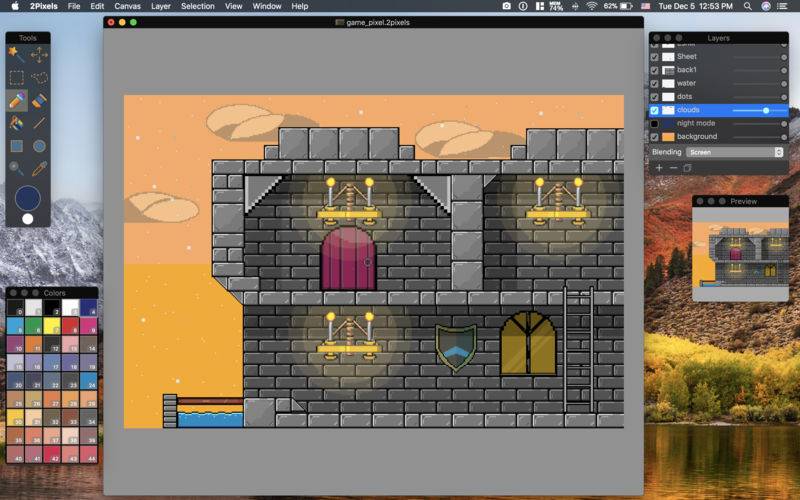
2Pixels is a pixel-art image editing software. It features an intuitive and innovative user interface with support for layers, unlimited undo, blending modes, and a wide variety of useful and powerful tools.
Pixel-Art is a graphic type which is found in old-school video games. You can learn more about Pixel-Art in our site.
2Pixels has a unique color palette system, layers with opacity and blending modes, high-zoom support, and easy to use interface is designed exclusively for Mac.
Specialized in pixel-art drawing, it includes a number of tools and effects that make it particularly suitable for pixel art, game graphics.
– Quickly and easily select any part of an image
– Edit only selected parts of layer or whole artwork
– Select and remove unwanted parts of your graphics
– Cut out objects from one graphic to place in another
– Draw with 2Pixels as you would on canvas
– Easily add lines, circles and rectangles with or without fill inside
– Real-time pixel preview
– Apply opacity and blending modes to layers
– Open and Save images using JPEG, PNG, TIFF, BMP and GIF file formats
– Export your artwork with different sizes in high quality format
2Pixels uses number of macOS features and technologies like Cocoa, OpenGL, Core Image, 64-bit, QuickLook, Full Screen and much more – so it’s super fast. And 2Pixels’ beautiful interface and image editing engine are fully optimized for Mac machines with Retina Displays.