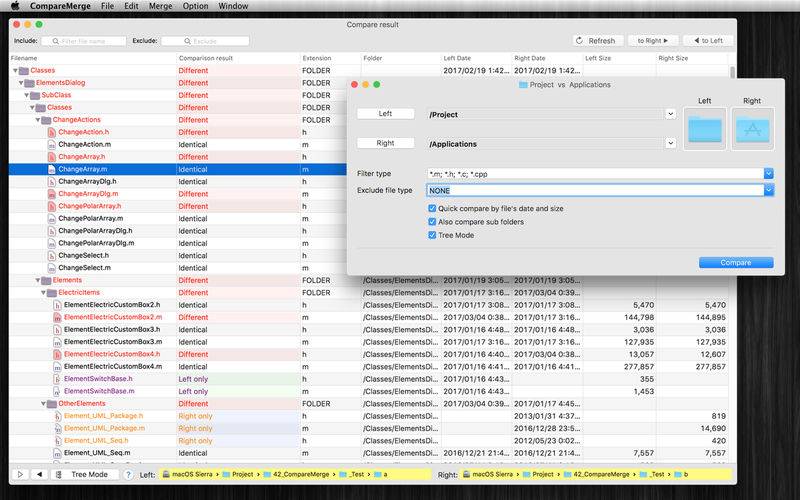
CompareMerge is a software tool for file comparison and merging text-like files.
It is useful for determining what has changed between versions, and then merging changes between versions.
Functions of the application:
– COMPARE FOLDERS/FILES: can compare both 2 files or 2 folders
– QUICK COMPARE FOLDERS: allow to quickly compare two folders’ files by size or date or both or with full content (slower)
– BLANK COMPARE: Allow to create blank edit window to compare text then save later
– CUSTOM THEME COLOR: User can select predefined theme color or customize edit text color, background color….
– INLINE EDIT (Edit/Merge at the same time) : Compare and Merge 2 text files: allow you to edit/compare/merge 2 text files in the same windows
– LINE NUMBER: When edit file, showing line number will make it easier to know exactly changes positions.
– GENERATE PATCH: the application also contains patch generating capabilities.
– FILE FILTERS: Include or exclude files that match regular expressions. Other than that, after compare 2 folders, you could filter display item base on file name.
– INCLUDE SUBFOLDERS: This option lets you control the depth of a folder comparison. Enabling it compares all folder levels
– COPY TO: after compare 2 folder, you can select left or right files to copy to different location (example: when release change source)
– DELETE Left/Right/Both: after compare 2 folder, you can select left or right files to delete
– IGNORE CASE, SPACE: Allow to ignore Case, Space in Edit/Merge window
– IGNORE End-Line code: Allow to ignore difference in End Line Code (LF for Mac・Unix file, CR-LF for Windows file, or CR for Mac classic file) in Edit mode.
Note: when compare folders, EOL was not ignored.
– EXPORT / CREATE REPORT: Allow to export compare/merge result to clipboard or to files (support formats: CSV, Text, HTML)
OTHER FUNCTIONS:
– Syntax highlight
– Theme color
– Export to zip file
– User can compare hidden files, folder (example: .git folder)
– Allow to merge binary-plist file
– In edit mode, a small view is show to the exact text difference