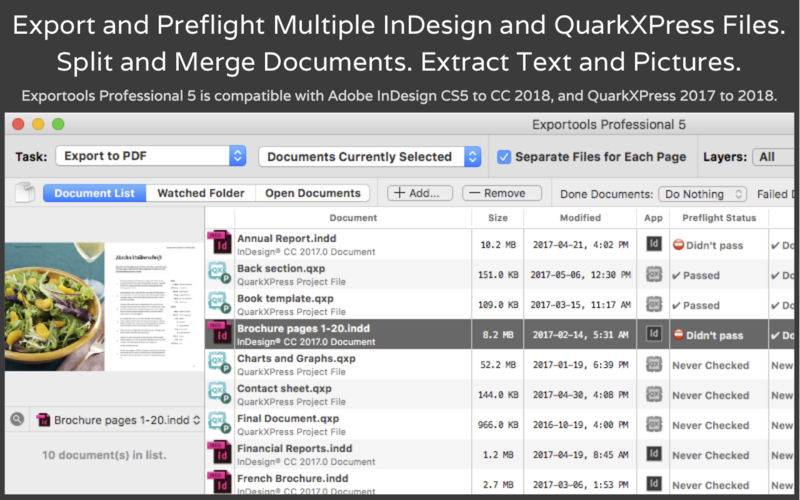
Exportools Professional allows you export, print and preflight multiple InDesign or QuarkXPress documents. You can export as single-page or multi-page PDF, PostScript, JPG, TIFF, PNG, RTF, HTML, Word, or print files (requires InDesign 2018 or older, or QuarkXPress 2017/2018). You can also split documents collecting links, and merge multiple documents into a single one retaining all the formatting and layout.
Key features:
– Output multiple InDesign and QuarkXPress documents to popular formats.
– Create one file for each page/spread or multi-page files.
– Split documents into smaller documents, retaining associated picture links.
– Merge multiple documents into a single one, including style sheets and master pages.
– Process documents located in custom file lists, watched folders, or open documents.
– Use templates to compose output file names.
– Create subfolders to hold exported files for each exported document.
– Preflight documents to catch common output mistakes before they happen.
– Save settings as custom presets. Load and save presets to disk.
– Filter which files to process, for example new files, or those currently selected.
– View and save reports: document history, preflight log, and batch log.
– Previews for InDesign and QuarkXPress documents as well as exported files.
Free version of Exportools Professional can only export to PDF (first 5 pages of each document).
Upgrade to the Full Version to use all features of Exportools Professional!
Requirements:
– To output InDesign files: Adobe InDesign CS5, CS6, CC 2014, CC 2015, CC 2017 or CC 2018.
– To output QuarkXPress files: QuarkXPress 2017 or 2018.