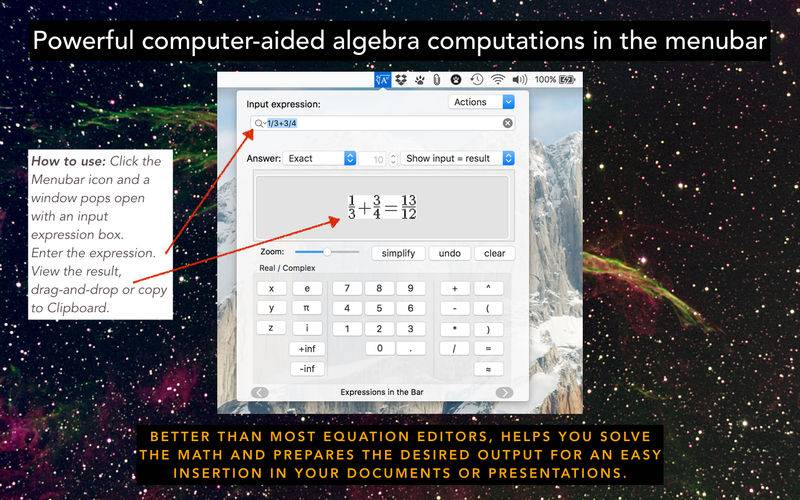
ExpressionsinBar is a simple menubar application which provides powerful computer-aided algebra computations.
It’s a powerful tool for evaluating mathematical expressions that lives in the menubar of your Mac ! So it is always just click away !
It can do numerical calculations – It can also do symbolic math !
Equations can be output in a PDF form that can be pasted into your Documents or Presentations !
It’s the perfect app for teachers, math students, scientists, and the geek among us !
• Unlike most other Equation Editors, ExpressionsinBar helps you resolve the math and then prepares a neat output for an easy insertion in your documents or presentations.
• How to use: Click the Menubar icon and ExpressionsinBar pops open an input expression box. Enter the expression, view the result. With the drag-and-drop feature, results are easily copied into text editors such as Pages or Microsoft Word, or presentation programs such as Keynote or Microsoft PowerPoint. Alternatively export the result of a computation in LaTeX syntax to TeX processors, such as TeXShop or TeXworks.
• Key features:
– Constants (π, e, etc.)
– Integers, fractions, floating numbers
– Sequences, lists, vectors, matrices, strings
– Operators (+, -, *, /, ^)
– Arithmetics on integers, rational, and floating numbers
– Arbitrary precision arithmetic, operating on signed integers, rational numbers, and floating point numbers
– Operations on fractions (integer and fractional parts, numerator, denominator, simplification, continued fraction expansion of real)
– Real functions (max, min, round, floor, sign, frac, ceil)
– Complex functions (re, im, abs, conj, arg, affix)
– Polynomials
– Factorial, binomial
– Exponential, logarithms, roots, powers
– Trigonometric functions, hyperbolic functions, and inverses
– Algebraic transformations (simplify, normal form, expand, factor)
– Trigonometric transformations
– Probabilities
– Statistics (1d and 2d)
– Polynomials algebra
– Algebraic calculus
– Numerical calculus
– Derivatives, limits and series expansion, integrals
– Equations, ordinary differential equations
– Units in operations
– Conversion of units, transformation to SI units, simplification of units
– Access to several fundamental constants of nature
• Extended user interface and keyboard features
– Scrolling panels with easy to use functions
– Menu with variables, functions, syntax and tips
– Use keyboard arrows to navigate function arguments
– Easily select to render “input only”, “input =”, “result” and “input and result”
• Render using LaTeX syntax for fastest type-setting
– “@” feature to interpret input with LaTeX syntax
– Flexible and easy way to format equations
– Use it to write chemical reactions (such as @NaOH+HCl rightarrow NaCl+H_2O)
• A simple User Interface
– Display short “howto” when typing
– Automatic completion of functions when typing
– Zoom slider
• Services integration – access the powerful tools within other applications, such as Word or Textedit
– Replace Selection by Result
– Replace Selection by Result in LaTeX format
– Replace Selection by Image of Result
• Support for OS X 10.8 and beyond
+++ Thank you to everyone for your cool comments and suggestions ! We are working on each one of them. +++