



如果要建立的书签组在一个子目录里,还可以插入“Submenu”的名称,最后在“Menu Item”里输入书签的完整名字
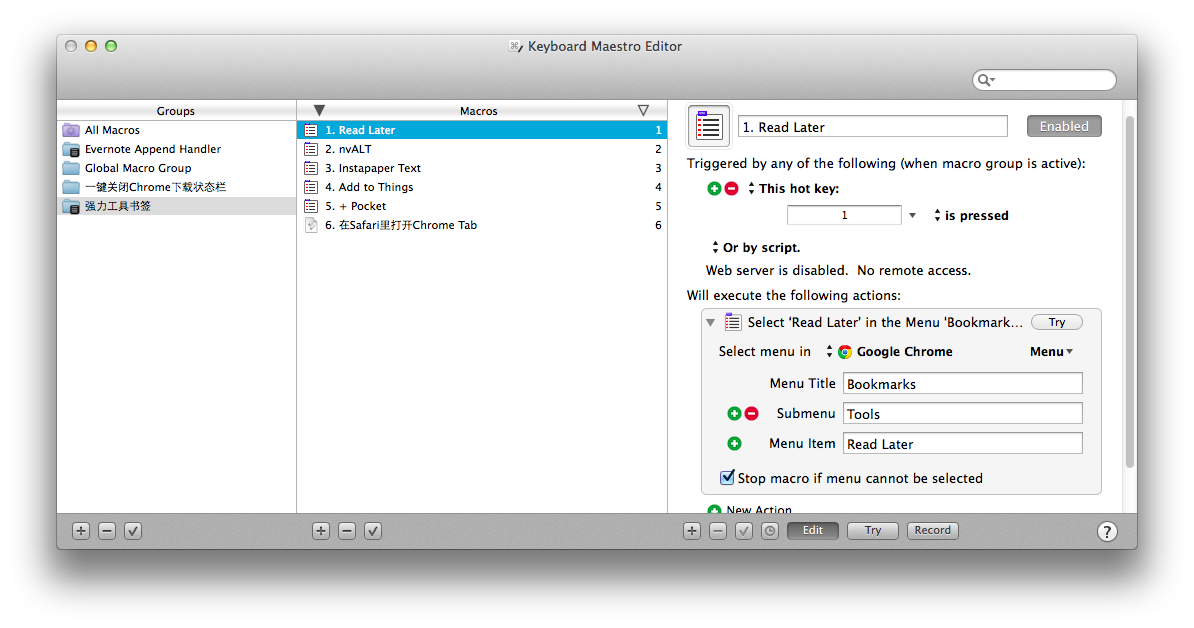
最后按书签顺序将书签依次建立成Marco放入Group里即可。
在这里分享一个我的“强力书签组”最后一个功能书签,其实就是一个AppleScript,可以将当期Chrome网页转到Safari打开:
set list_Tabs to {}
tell application “Google Chrome”
set the_Tabs to (tabs of every window)
repeat with the_Tab in the_Tabs
set the_Items to (every item of the_Tab)
repeat with the_Item in the_Items
copy URL of the_Item to end of list_Tabs
end repeat
end repeat
end tell
tell application “Safari”
repeat with list_Tab in list_Tabs
set myTab to make new tab at end of tabs of window 1
set URL of myTab to list_Tab
end repeat
end tell
这篇教程对你有帮助吗?









半夜美食-0-
如何设置才能使得 Palette 使用后自动关闭呢?
2014-08-14 11:39
玩儿法
你要给group的trigger设立一个hotkey
2014-03-28 16:19
Kei_red
请问如何建立一个Palette的group ,我直接点加号出来的是一个普通文件夹图标的group,貌似和文中图标不一样(文中图标右下角还有个黑色)
2014-03-28 15:47
玩儿法
感谢关注我们的系列文章,你要给group的trigger设立一个hotkey
2014-03-28 16:20
Kei_red
谢谢,原来group也有trigger,明白了~
2014-03-29 06:30
Daniel0829
要不要考虑来一发Keyboard Maestro的福利呀?^_^
2014-03-26 09:33
玩儿法
We will try.
2014-03-26 12:14