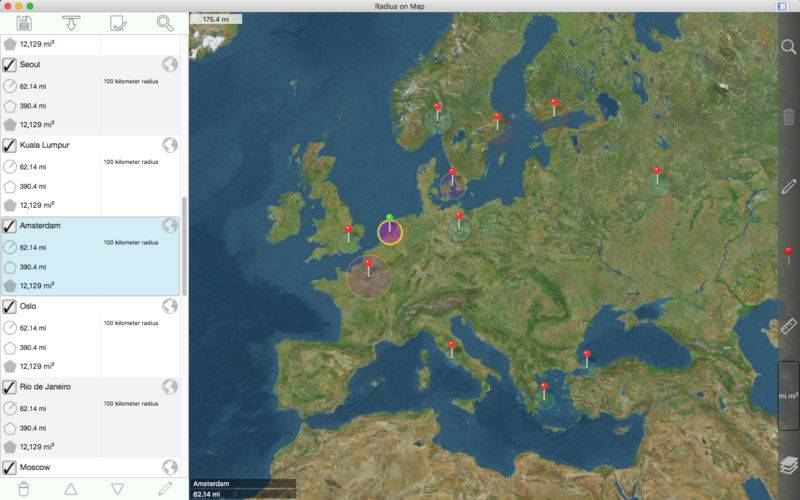
Easily make and edit radii on a map.
Properties for each radius:
– Center coordinate
– Radius
– Fill color and opacity
– Perimeter color and opacity
– Name
– Notes (optional)
Other features:
– Import radii stored as polygons in a .kml file.
– Export radii as 60 point polygons saved to a kml file to view in Google Earth™ or other mapping applications.
– Ability to specify which radii show on the map by selecting them in the list view.
– Search for keywords in name and notes fields to find a specific radius.
– Show current location on map. This requires WIFI to be on and at least one mapped WIFI network nearby.
– Forward geocoding: Find locations on the map by typing an address.
– Reverse geocoding: Find addresses near a given point on the map.
– Create a new radius from a geocoding result.
Coordinate formats include:
– Degrees
– Degrees, Minutes
– Degrees, Minutes, Seconds
(Datum used is WGS-84)
Distance units include:
– Kilometers
– Miles
– Nautical miles
– Meters
– Yards
– Feet
– Custom. Define your own distance units in terms of meters. For example 1 centimeter = 0.01 meter and 1 kilometer = 1000 meters.
Area units include:
– Square meters
– Square feet
– Square yards
– Square kilometers
– Square miles
– Square nautical miles
– Acres
– Hectares
– Custom. Define your own area units in terms of square meters. For example 1 square centimeter = 0.0001 square meter and 1 square kilometer = 1000000 square meters.
Other notes:
– Includes undo / redo functionality for important operations such as move, add / delete, and change radius.
– A radius should not cover more than half of the Earth’s surface.
– A radius over a pole is fine, but a single radius should not include both poles.