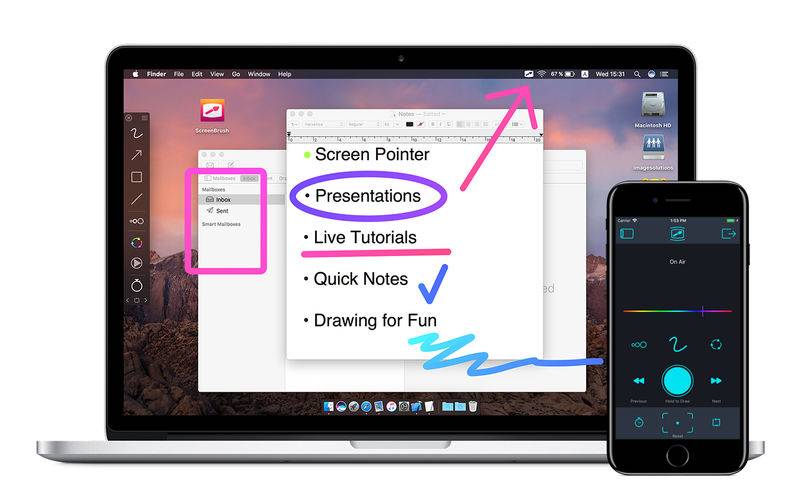
Draw over the entire screen.
Quick and useful way to demonstrate something on your screen by drawing. It helps to concentrate attention on significant points.
– Use ScreenBrush like a laser pointer.
– Use ScreenBrush Remote as a “clicker” for Keynote or Microsoft PowerPoint presentations to change slides.
– Using Touch & Pen Pressure option in preferences Brush Tool will use size depending on pressure when your device support variable pressure.
– You can take a quick tour to explore the app more effectively and quickly.
Features:
• Drawing over screen windows
• Change slides of presentations
• Paint over a fullscreen app
• Simple and useful toolbar
• Click through canvas by holding Fn key
• Clear Screen with drawing with Delete key
• Move drawing by holding Cmd key
• Repeat last drawing
• Color Wheel to adjust color of a tool
• Shortcuts assignable
• Statusbar app
• Quick Tour
• Multiple screens support
• Support for the Touch Bar
• Retina display support
• ScreenBrush Remote for iOS
ScreenBrush Plus:
• Arrow
• Rectangle
• Ellipse
• Line
• Freeze Drawing
• Undo and redo