What have you done on my Mac?
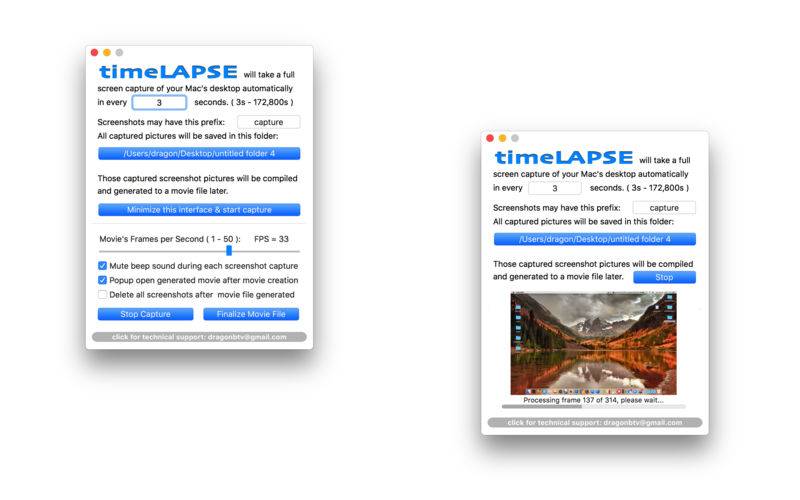
timeLAPSE will take a silent screenshot of your Mac’s desktop automatically and periodically at an interval according to your setup, from between 10 seconds to 24 hours. All captured screenshots will be saved in a folder of your choosing. Then, these captured screenshots can be linked and compiled into a continuously played time-lapse video at any time.
timeLAPSE is ideal for computer security and educational usage like as a child computer behavior monitor, it’s also very useful for medical care professionals, law enforcement personnel, journalist and researchers, to act as a computer event tracking and analyzing app.
You may even use it to create your attractive personal video diary or freelancer’s invoice attachment and share it with friends and client.
features: v1.11
– Silent and user unnoticeable automatic screen captures;
– Screenshot capture’s interval can be choose from between 30 seconds to 24 hours, accurate to the second;
– User may choose any folder as destination, anywhere ( yes, ANYWHERE! ) that Finder can handle could be used;
– With full screen capture, high resolution full motion movie captures anything and everything;
– Time-lapse videos was compiled with a single click in incredible speed;
– You may choose to delete the screenshots after the video has been compiled.
v1.11 -> v1.31
– add simple password protection;
– slight modification of app icon;
– add “More By dragonBTV menu”;
v1.31 -> v1.45
major upgrade version
– app’s icon changed
– lower the minimum in between capture time to 10 seconds
– add feature request function & menu
– add status menu icon and menu
– add Hide & Display interface menu item
– add dock menu
– add Preferences menu
– add option not displaying dock icon
– add Beep sound while compiling movie
– more detailed technical support email templet
– more detailed feature request email templet
– update more by dragonBTV menu & panel
v1.45 -> v1.48
– the FPS (frame per second) rate of the crated movie can be freely changed from 1 to 50fps
– longest capture interval changed to two days (172,800 seconds)
– click for technical support button updated
– more by dragonBTV updated
v1.48 -> v2.00
– Sandboxed OS 10.7 – 10.8 compatible version
– full ARC coding
– option added, user can set prefix of the screenshots
– option added, mutable beeps after each picture finalized
– option added, user may stop capture but do not finalize the movie
– Finder alike screenshots sorting before compiling the movie
v2.00 -> v2.52
a major upgrade version
– fully re-coded Sandbox ARC version for macOS Sierra 10.12
– updated to macOS Sierra 10.12 and still compatible to OS10.7 and above
– all deprecated function are replaced
– all file operation are Sandbox compatible
– option added: the current processing frame can be monitored
– option added: movie processing can be interrupt
– option added: deletion of screenshots are double protected by user alerts
– interface redesigned
– app menu rearranged
– hide app icon option is removed
– what is FPS added to Support menu
– password panel modified
– color of app icon changed
– change color of all popup alerts into white
– change smallest capture interval to 3 seconds
– captured screenshots number displayed on dock icon
– More apps by dragonBTV is simplified by displaying in App Store directly
v2.52 -> v2.53
– icon color change back to blue
– thread processing efficiency improved
– performance improvements for macOS 10.13 High Sierra