

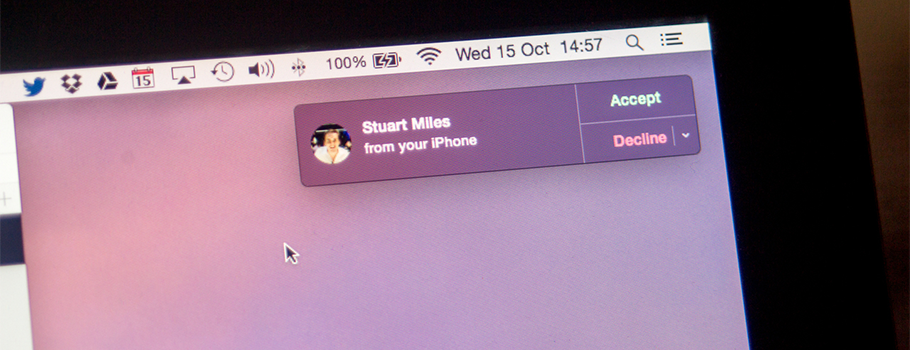
最近很多小伙伴抱怨,在将设备升级至 OS X Yosemite / iOS 8 后,一切顺利,但就是做不到开发者大会上演示的「连续性」功能 [Continuity](http://www.apple.com/cn/osx/continuity/)。在确保设备无误的条件下,遇到此问题的读者,可以按照以下步骤顺利开启。
##设备要求
• MacBook Air (Mid 2012 and later)
• MacBook Pro (Mid 2012 and later)
• iMac (Late 2012 and later)
• Mac mini (Late 2012 and later)
• Mac Pro (Late 2013)
—————————————
• iPhone 5 or later
• iPhone 4s (sharing iPhone calls only)
• iPad (4th generation), iPad Air, iPad Air 2
• iPad mini, iPad mini with Retina display, iPad mini 3
• iPod touch (5th generation)
这篇教程对你有帮助吗?








volcano
我想问什么是确保 Mac 与 iOS 设备至少尝试过一次蓝牙同步?谢谢。是指Mac打开蓝牙,连接一下 iPhone?
2014-10-24 07:47
Frank
我想应该是这样的,至少连接过一次。
2014-10-24 12:36
JailJT
对,连接失败也不要紧,只要让 Mac 端的蓝牙连接设备列表里有你的 iOS 设备就行了
2014-10-24 13:46
LYcHEE
JailJT 真是高产啊。。。
2014-10-23 21:32
Frank
你头像咋不显示了?
2014-10-23 23:30