Edit GPS eXchange format (GPX) files on your Mac.
GPX Editor can edit GPX files exported from many GPS devices and other apps.
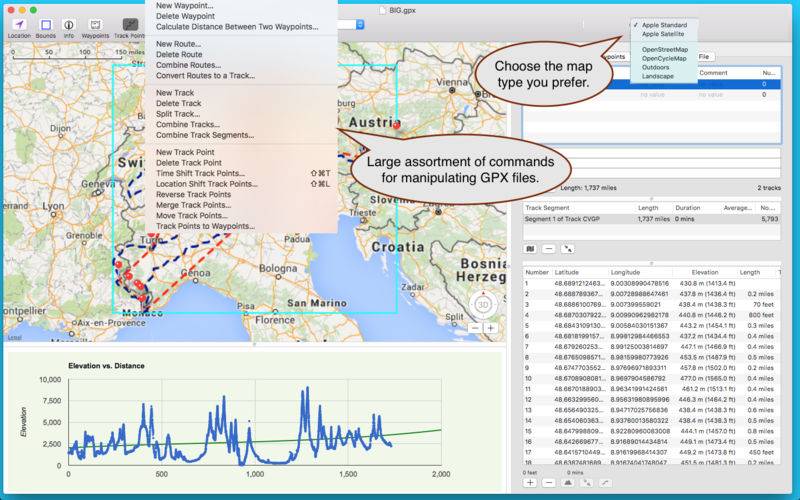
– Open, edit and save multiple GPX files.
– View with Apple Maps or Open Street Maps.
– View and edit waypoints, routes, tracks, track points, and file info.
– View charts such as elevation vs. track point (when elevation exists).
– Copy waypoints, routes, tracks and file info and paste to a spreadsheet.
– Copy & paste waypoints, routes, and tracks from one file to another.
– Show or hide waypoints and track points.
– Drag waypoints and track points to a new location on the map.
– Add new waypoints, routes, tracks and track points.
– Get current weather for a waypoint or track point.
– View Google map of waypoints or track points when available.
– Download elevation for any waypoint or track point.
– Take a screen shot of the map for printing or reference.
– Drag and drop track points to rearrange their ordering (within the track point list).
– Preferences let you change pin, route and track colors and more.
– Flickr search for photos and videos at any waypoint or track point location.
– Delete waypoints, routes and track points to refine your GPX file.
– Delete multiple track points easily.
– Merge track points.
– Combine track segments.
– Combine tracks.
– Convert track points into waypoints.
– Delete track segments.
– And more!
For example, you have a track from a bike ride, but you want to trim the beginning and end portions of the track. With GPX Editor it’s easy to delete multiple track points for this very purpose!