Make movies with Ultra HD quality from your photos!
Hundreds of thousands of photos can be compiled into a high-quality movie with 4K, 8K Ultra HD resolution or better – all with just a few simple clicks.
photo2movie is also an extremely efficient productivity tool for making stop motion movies and animated films with a batch of photo frames.
Features v2.06
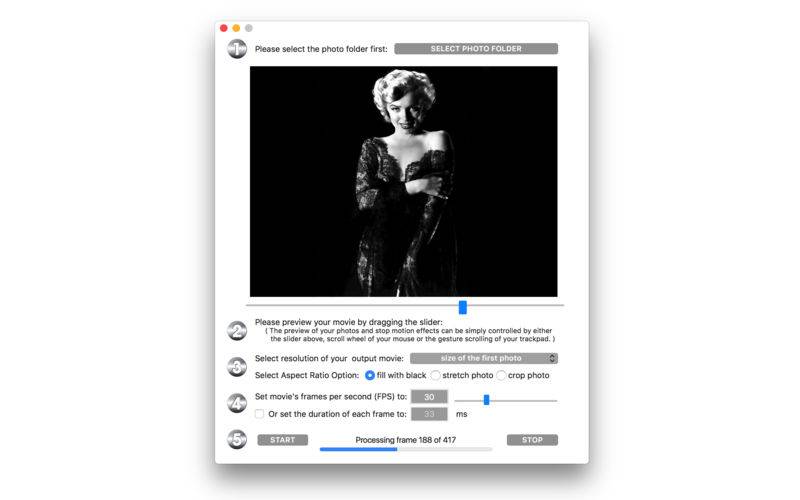
– elegant preview function, you can preview your movie before even generating it;
– preview function can be controlled by a slider, mouse scroll wheel, or trackpad gestures;
– alphabetically sort and compile photos in a folder into a movie file;
– supports .jpg and .png image formats;
– custom frame rate setting: from 1 FPS to 100 FPS ( anything between 0.01 to 1 second display time per photo frame);
– control the quality of your movie by preset resolutions;
– movie resolution can be automatically set to the first photo’s resolution.
– detailed progress indicator and frame counter;
– compilation can be interrupted at any time and the already compiled parts will still be a usable movie file
– 8 to 10 times faster conversion speed compared to other apps of us.
v2.06 -> v2.10
– specially optimized for OS 10.10 and OS 10.11
– processing speed improved 20% or more compared with v2.06
– all deprecated functions are fixed and upgraded
– tips and Q&A displaying better under lower resolution
– the app is more compact in size
– fix an issue of “progress indicator hidden after using interrupt stop”
– color and size of app’s icon are modified
– more by dragonBTV updated
v2.10 -> v2.50
– more efficiency running on macOS Sierra
– processing speed improved
– interface re-designed
– app’s icon changed
– major option added: select movie’s aspect ratio
– Tip added related to Aspect Ratio Selection
– Q&A updated
– more by dragonBTV updated
v2.50 -> v2.55
– fix auto layout issue on low-resolution devices
– fix SF fonts display stretching issue on the guest account, change to system fonts
– the black background of photo preview is removed
– protection added while opening a corrupted picture file
– all alert windows changed to the white background color
v2.55 -> v2.57
– bug fixed: correct misspelling on the interface
– startup tip modified
– menu re-arranged for simplification
– more by dragonBTV simplified
– app size dramatically reduced
– thread processing efficiency improved
– performance improvements for macOS 10.13 High Sierra
v2.57 -> v2.60
– MacBook Pro Touch Bar support added
– a newer core for crystal clear color and processing efficiency
– a cancel button added to movie file saving confirmation dialog