RecArtNet is an easy to use recorder for ArtNet that allows you to record and play back up to 256 universes in 16 subnets on your computer – ideal for architectural lighting, installations or as a backup system for light shows.
The possibility to auto-play opened files and auto-exit after playback makes it easy to run shows at specified times using any scheduling tool that can open a file with its associated application.
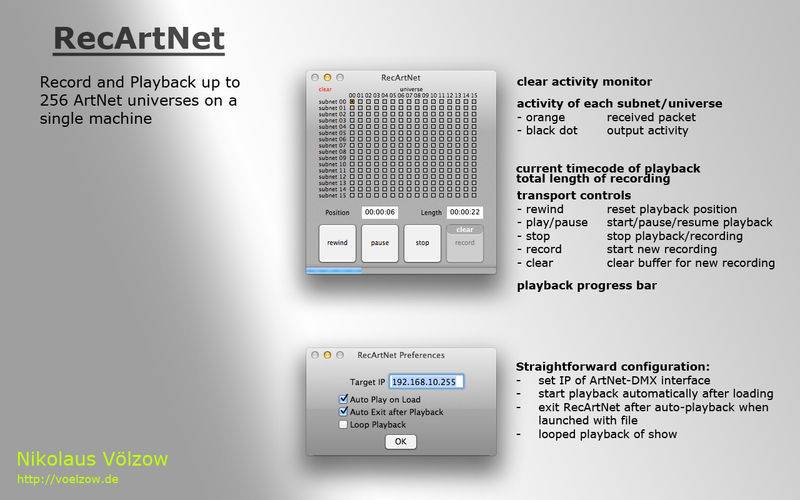
Straightforward setup:
– simply enter the IP of the ArtNet interface in the preferences
– set the loop, auto-play and auto-exit options as needed
Easy recording:
– connect the computer to your ArtNet network
– launch RecArtNet, hit the record button and run the show to be recorded from your console
– press the stop button when finished, save the recording to disk
and playback:
– launch ArtNetRec and load a recording – or simply double click on a saved show
– if auto-play is disabled in the preferences, press play manually
– enjoy the recorded show over and over again
Monitoring:
– RecArtNet shows you exactly which universes are being recorded and played back